Discover biopharma assets on the Network page
Discover relevant assets and find potential partners without leaving your Deal workspace.
Overview
Plan availability: Essential/Advanced
User role required: Manager/Contributor (see details)
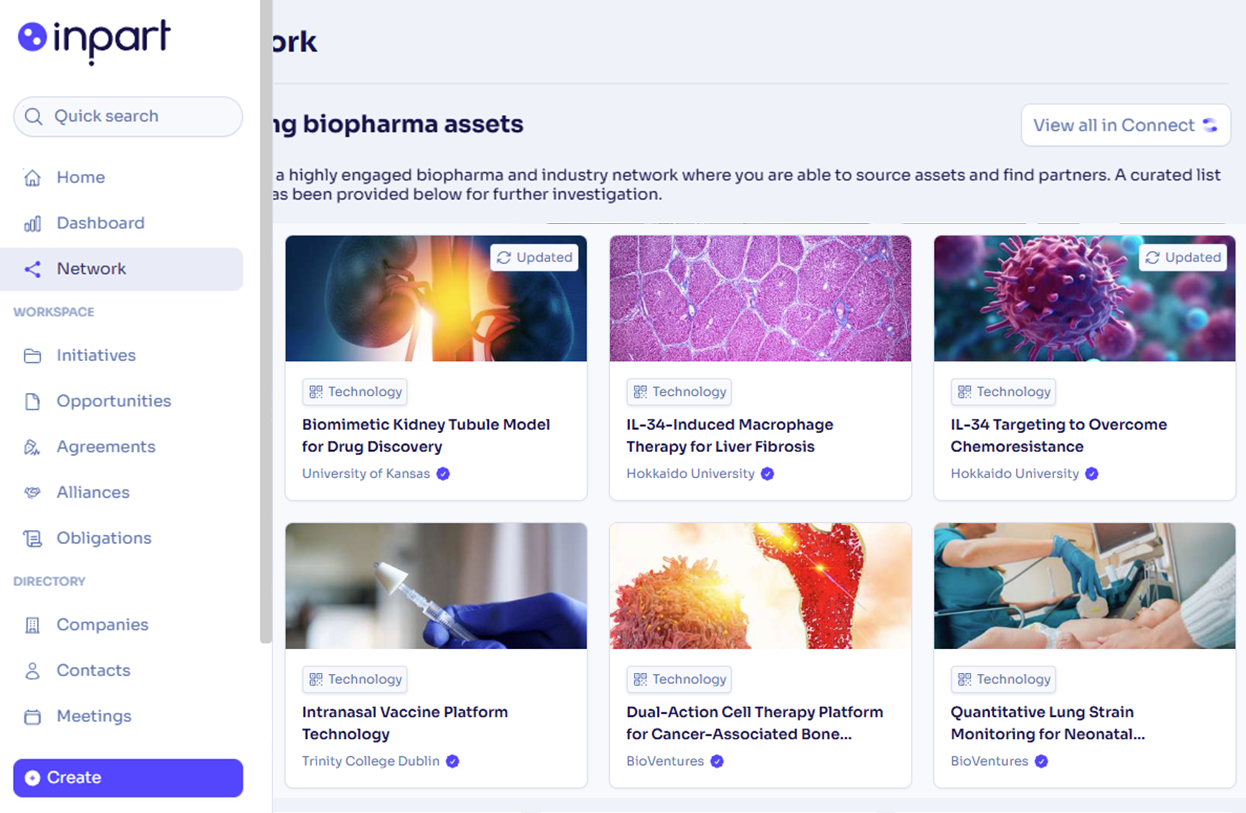
The Network page surfaces a curated selection of trending biopharma assets or technologies from Connect directly within Deal.
Access trending biopharma assets
Open the Network page, a Trending biopharma assets section is displayed at the top. It shows a curated list of assets and technologies sourced from Connect for further investigation. The asset selection covers the following therapeutic areas: Oncology, Immunology, CNS, Neuroscience, Rare diseases, Infectious diseases, Metabolic disorders, Vaccines, Cardiology, Diabetes, Animal health, Respiratory, Gastroenterology.
Each asset card displays:
- The asset type (e.g. Biopharma asset or Technology).
- The asset/technology title.
- The name of the publishing organisation.
Open assets in Connect
You can either click one of the assets to open its description in full view, or click View all in Connect in the top-right corner of the section.
- If you already have a Connect account and you're logged in, you will land directly on the asset page or the main asset list in Connect.
- If you already have a Connect account but you're not currently logged in, you will land on the Connect login page, and then you will be redirected to the asset page or the main asset list in Connect.
-
No Connect account? Creating one is free and takes just a minute! Click Create a free account. You will land on the Connect login page, and then you will be redirected to the relevant page in Connect.